If you have searched for HVAC appointment scheduling software lately, you have probably found two kinds of product: enterprise platforms priced per technician and built for big companies, and generic booking tools that suit a yoga studio and know nothing about a no-heat call at 10pm.
Neither solves the problem most HVAC contractors actually have.
This post covers what scheduling software needs to do for an HVAC business, what the real options are in 2026, and where AI fits.
What makes HVAC scheduling different
HVAC scheduling involves more than putting appointments on a calendar. It comes with constraints that generic tools were never built for.
Emergencies and routine calls need different handling. A spring tune-up can go three weeks out. A homeowner with no heat in January cannot wait three weeks, or three hours. The routine caller needs a convenient slot. The one with no heat needs to reach someone that night and hear back from someone who can come out, and how that happens depends on your own after-hours rota more than on your calendar.
After hours is when it matters most. The most valuable calls (system failures, no heat, no AC in extreme weather) come in heavily in the evenings, at weekends and during weather events. A scheduling setup that only works while someone is in the office solves half the problem.
Jobs take very different amounts of time. A diagnostic might take an hour, a replacement six, a maintenance check 45 minutes. HVAC scheduling has to account for job type, travel time between jobs and which tech can do what.
The caller is not always the decision maker. Tenants call about rental properties, office managers about commercial sites, and spouses for each other. Whatever takes the booking has to get the right contact and site details without assuming the caller owns the place.
Three kinds of scheduling software contractors use
1. Field service platforms (ServiceTitan, Housecall Pro, Jobber)
These are the all-in-one platforms built for the trades. They handle scheduling, dispatch, invoicing, payments, customer history and reporting in one system.
ServiceTitan is the best known and is used by many large HVAC companies. It is powerful, and it is priced for larger operations, with per-technician pricing and a real onboarding effort. For a shop with one to five techs it is often more than the job needs.
Housecall Pro and Jobber are more accessible, running roughly $49 to $349 a month depending on the plan. Both are good tools for small and mid-size shops that want scheduling, invoicing and basic dispatch in one place. If you manage jobs on a whiteboard or a spreadsheet today, either is a big step up.
The catch is that all of them assume someone is there to take the call, book the job and enter it. They handle job management well. They do nothing about the call nobody picks up.
2. Online booking tools (Calendly, Cal.com, Acuity)
These let customers pick a slot from a calendar link. They suit businesses with predictable, identical appointments: consultants, therapists, tutors.
For HVAC they are a partial answer at best. A homeowner with a dead AC at 9pm wants to talk to someone, and a booking link cannot ask what the equipment is doing or write the answer down.
Some contractors use a booking link for demos or non-urgent maintenance requests, which is reasonable. As the main way calls get handled, it falls short.
3. AI phone assistants that take the booking
This is the newest category, and it goes straight at the gap the other two leave: calls that come in when nobody can answer, with the booking taken on the call.
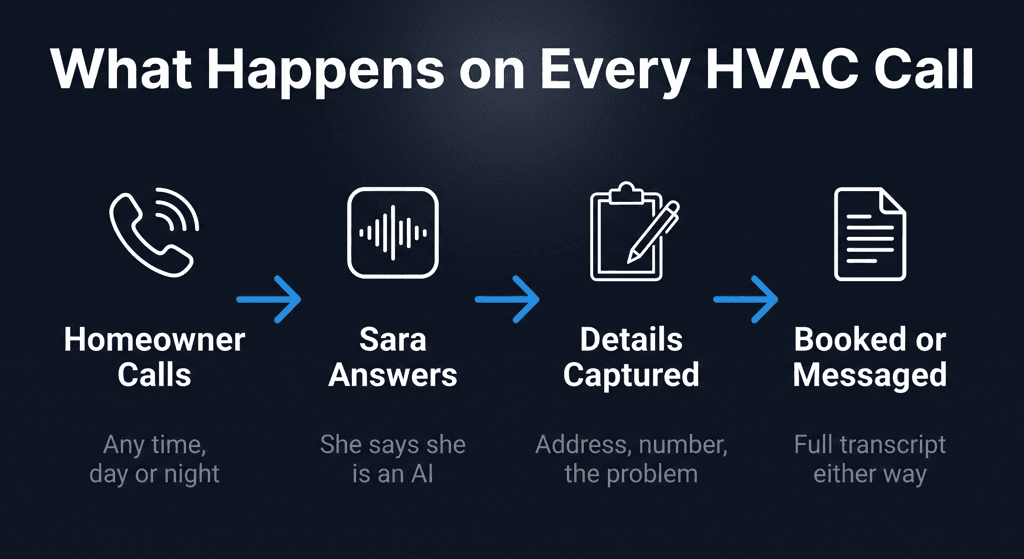
An AI phone assistant answers every call at any hour, holds a real conversation about what the caller needs, writes down the problem in the caller's own words, and takes the booking when there is one. The booking appears in the contractor's dashboard without anyone typing it in.
Thermoi's Sara works this way. A homeowner calls at 10pm. Sara answers, asks what the equipment is doing, takes the address and the details, and if they want a visit, the day and part of the day that suits them. She cannot see your calendar, so she never promises a time; you confirm it. The contractor wakes up to a log of every overnight call, with transcripts and booking requests already in the dashboard.
Field service platforms run the back office once a job exists. AI phone assistants handle the front door, the moment the call comes in. Plenty of shops end up using both.
What to look for
Whether you are comparing field service platforms or AI phone systems, these are the things that matter for HVAC.
A real conversation. A homeowner whose heat has just quit will not work through a menu or a form at 9pm. Whatever answers has to ask what the equipment is doing and write down the answer as the caller said it.
After-hours coverage. Every gap in coverage is a gap in revenue. The system should take calls and bookings at 2am as reliably as at 10am.
Where bookings end up. Ideally bookings land in the calendar or field service platform you already use without retyping. Ask every vendor exactly how. With Thermoi today, bookings land in the Thermoi dashboard and your team copies them across; writing straight into Google Calendar or a field service platform is on our roadmap.
Call records and transcripts. Every call should leave a written record, for quality checks, disputes, and seeing your call patterns over a season.
Languages. In Phoenix and across the Southwest, a real share of calls come in Spanish. Ask which languages a system handles today. Thermoi answers in English at the moment.
Pricing that fits a small shop. A two-tech operation does not need enterprise software priced per seat. For a small shop, software in the tens to low hundreds of dollars a month that solves one problem well is usually the better buy.
The gap most scheduling software leaves
An honest summary of the market in 2026: ServiceTitan, Housecall Pro and Jobber are excellent at managing jobs once they are in the system. They are not built for the moment a call comes in and nobody is free to answer it.
That gap (after-hours calls, overflow in busy weeks, the Friday night emergency) is where HVAC shops lose the most work, and it is what AI phone assistants are built for.
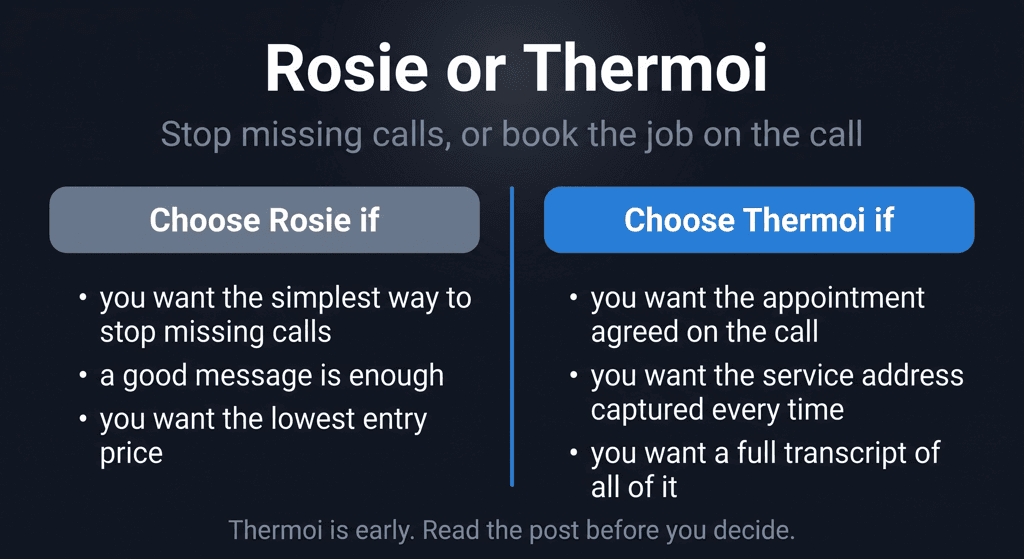
For most small shops the right setup is two tools: a lightweight field service tool for jobs and invoicing, and an AI phone assistant so every call gets answered and booked at any hour.
If you are not using any scheduling software yet and still run jobs from a whiteboard or your cell, the best place to start is usually the missed calls. A booking you never heard about is worth nothing. A call answered at 11pm on a Saturday, with the booking taken, can be a $400 to $700 job waiting for you in the morning.
How Thermoi fits
Thermoi covers the call handling and booking layer, the front door of your operation. Sara books the appointment on the call: she answers day and night, takes the address and the problem in the caller's words, and takes the day the caller wants. Every call comes back as a summary and full transcript.
The first month is free for up to 40 calls, with no card and no contract. It runs on your real phone line with full transcripts of every call. At day 30 you get a report of calls answered and appointments booked, with the transcript of every call, and you either pay $299 for month two or let it end, owing nothing. After that it is one plan: $299 a month for up to 200 calls.
How a booking works step by step, and where bookings go today, is on the HVAC appointment scheduling page. Before you trust any phone system with your bookings, make the eight test calls in our buyer's guide on it.